Modifying Fare Records
Selection results and changed fares can be manually changed to create new fare records, modify existing records, or make a change to a changed fare result. If you change a selection result, the original version of the result remains on the Selection Results tab. Once you have a selection result you can only have one changed fares associated. The selection results and changed fares for International, US/CA, and Add-on.
Fare records can be modified by typing over the fare record in the table or by using the buttons above the table on the Selection Results or Changed Fared tabs.
Selection Results Tab— Buttons and Fields
|
|
|
Displays
detailed batch information and the footnote/rule text associated
with the fare record. This button is always enabled on the Selection Results tab. However,
it's only enabled on the Changed
Fares tab if you click the |
|
Permits downloading results to an MS Excel or Word file. |
Text for Eff Date:
|
|


 button first.


 button.
Changed Fares Tab— Buttons and Fields
In addition to the buttons listed above (with the exception of the Cancel Fare button), the following buttons display on the Changed Fares tab:
|
This button is only located on the Changed Fares tab. When this button is clicked, it validates any changes made in the Changed Fares table. |
|
This button is only located on the Changed Fares tab and is used to submit the change results to a batch once you have made any necessary modifications to the fares. |

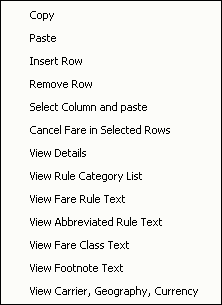
Right-Clicking a Row in the Table
|
All
of the buttons, except for |
Saving
There is an implicit save built into the system when you click between the Selection Results and Changed Fares tabs or move to another page if there are multiple pages of selection or changes any modifications and/or additions will be saved. These saved modifications or additions will be displayed in the Changed Fares tab.
Related Topics
- About Changes
- About Criteria Sets and Query
- About Exclusions
- About Inclusions
- About Matches
- Add, Modify, Restore To/Before, Cancel, Copy as Is, and Copy and Change to New
- Changes Field Descriptions
- Create Criteria Sets and Queries
- Delete a Criteria Set
- Exclusions Field Descriptions
- Inclusions Field Descriptions
- Maintaining Criteria Sets
- Match Options and How They Work with Change Types
- Matches Field Descriptions
- Preview Changed Fares and Submit to Batch
- Submit Preview
- Save and Copy a Criteria Set
- Scopes and Sources
- Selection Results and Changed Fares
- Modifying Fare Records
- Submit to Batch
- Update an Existing Criteria Set
- Submit Inquiry