Release a Batch
Releasing a batch makes the data in the batch available for Subscriptions. Once the batch is released, you cannot use it anymore. A batch must be active before it can be released.
Click the Batch List tab and then click the Release Batch link. Alternatively, you can click the Active Batch link on the dashboard and then click the Release Batch option on the menu (see image below).
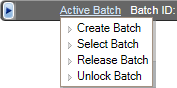
You can schedule the release of a batch up to seven days in the future. For more information, see Batch List.