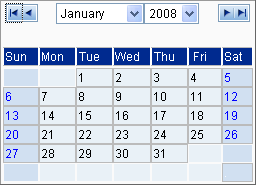
Click the Calendar button. The Calendar dialog box appears.
Select a month from the drop-down menu, or click the left arrow to select a previous month or the right arrow to select a proceeding month.
Select a year from the drop-down menu, or click the left arrow to select a previous year or the right arrow to select a proceeding year.
Select a day by double clicking one of the days displayed in the dialog. The dialog box closes and the selected date is entered into the appropriate field.
 button. The Calendar dialog box appears.
 to select a previous month or the right arrow
  to select a proceeding month.
 to select a previous year or the right arrow
  to select a proceeding year.